OverviewUse this guide to understand what each status represents in the procurement workflow, so you can efficiently sort and track orders based on their current progress. |
Jump to:
Order filtering
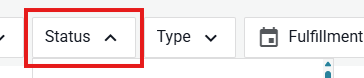
To Filter your orders, go to the Orders page and use the Status dropdown:
Here are the various order status designations and their definitions:
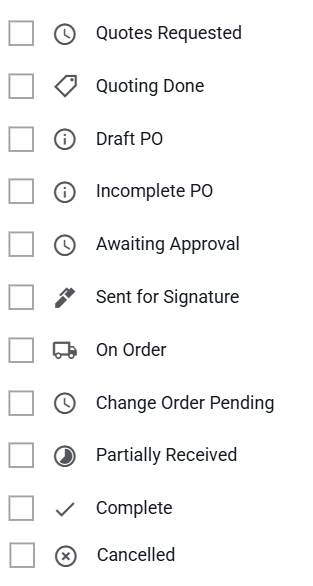
Quotes Requested:
Your RFQ has been sent to your supplier(s), and is now waiting for quotes to come back.
Quoting Done:
Your quotes have been returned, and/or the due date has passed. It is now time to review the bids and select a supplier to award the PO.
Draft PO:
Your order is saved prior to completion after clicking "Save & Exit". It is not finalized or submitted yet and may be missing details.
Incomplete PO:
The PO has been started but is missing essential information and cannot proceed until completed. This status is typically for an In-Store PO.
Awaiting Approval:
The PO has been created and is pending approval by a team member before sending to supplier (or internally).
Sent For Signature:
The PO requires a signature prior to processing. The signature request has been sent and is awaiting completion.
On Order:
The PO has been approved and issued to the supplier (or internally). Items are actively being processed or shipped (if applicable).
Change Order Pending:
There is a requested modification to an already issued PO. It’s waiting for approval by a team member before the update is applied and sent.
Partially Recieved:
The PO has been issued and some, but not all, of the items or services have been delivered. The remaining quantities are still outstanding and pending fulfillment by the supplier. This status also applies to POs marked as Complete when they have only been partially received.
Waiting for Quotes:
The system is currently collecting quotes from suppliers. No final quote has been selected yet.
Complete:
The PO process is fully finalized. Goods/services have been received and invoiced (if applicable).
Cancelled:
The order has been canceled and will not be processed further.
Invoice Filtering
To Filter your invoices, go to the Invoices page and use the Status dropdown:
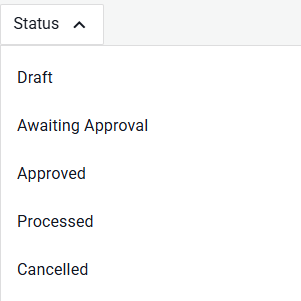
Draft:
The invoice has been saved prior to completion.
Awaiting Approval
The invoice has been submitted and is waiting for approval before processing.
Approved
The invoice has been reviewed and approved.
Processed
The invoice has been marked as processed in the system.
Cancelled
The invoice has been cancelled and can no longer be actioned.
Requisition filtering
To Filter your requisitions, go to the Requisitions page and use the Status dropdown:
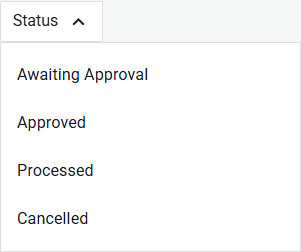
Awaiting Approval
The requisition has been submitted and is waiting for approval before processing.
Approved
The requisition has been reviewed and approved.
Processed
The invoice has been marked as processed in the system.
Cancelled
The requisition has been cancelled and can no longer be actioned.
Need help?
Reach out to our Customer Support team:
- Call us toll-free at 1-833-712-5021
- Chat with us in our web and mobile apps