| Overview Purchase Order e-signatures allow you to send POs to suppliers for approval and capture signatures digitally—all within the platform. This feature helps streamline approvals, reduce delays, and keep a clear record of every signed purchase order. |
Requiring PO Signatures
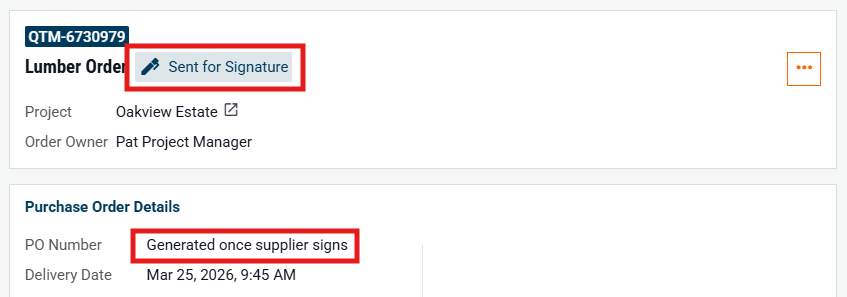
When Require PO Signatures is enabled, POs must be signed by both the issuer and supplier before being issued. A PO number will only be generated once fully signed.
- If this feature is not currently active, please reach out to your company's administrator to have this enabled.
How It Works
- Create and Sign the PO
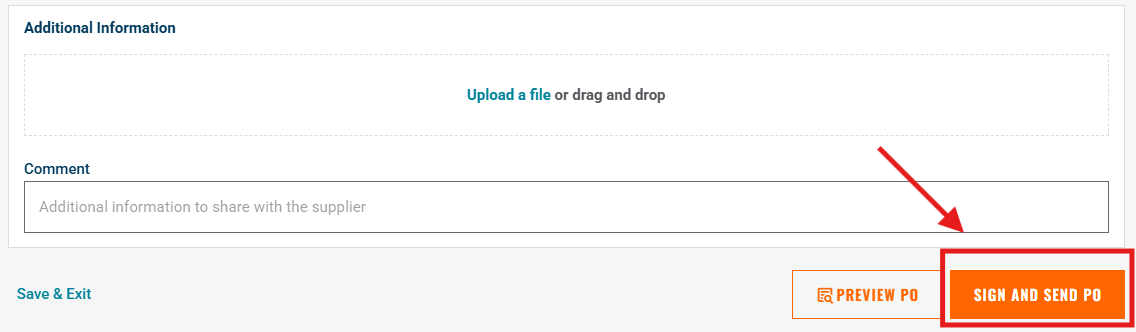
- Create a Purchase Order and click “Sign and Send PO.”
- Add Your E-Signature
- Type your name to generate your e-signature.
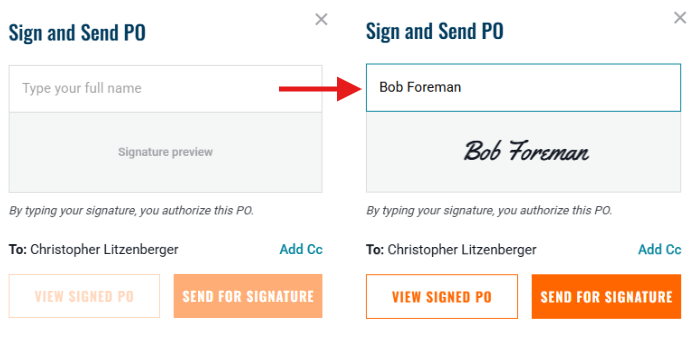
- Click “Send for Signature” to send the PO to the supplier for approval.
After Signing:
• The PO is finalized
• A PO number is generated
• A PDF copy is emailed to the supplier and recipients
• The signed PO is stored for future reference

Need help?
Reach out to our Customer Support team:
- Call us toll-free at 1-833-712-5021
- Chat with us in our web and mobile apps