This feature is only accessible by Admin users. This is only accessible on the web version of QuoteToMe. |
Edit your project
Projects occasionally need to be updated throughout their lifetime. Here's how!
Step 1. Select Projects from the left navigation drawer:

- A list of your projects will display. Select the project you want to edit.
Step 2. In the Overview section, click the Pencil (✏️) icon next to the field you want to edit.
Step 3. Edit the form.
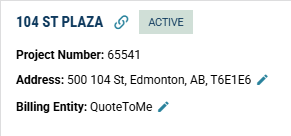
- For integrated projects (indicated by the link icon), only the address and billing entity fields are able to be edited. The project name & number can only be changed in the integrating software.
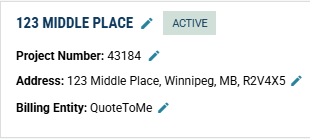
- For unintegrated projects such as the below, all of the fields can be modified:
Step 4. Click Save.
Your project is now updated.
To add or edit cost codes, see our Manage Project Cost Codes article.

Need help?
Reach out to our Customer Support team:
- Call us toll-free at 1-833-712-5021
- Chat with us in our web and mobile apps