| Here we will show you how to setup the integration between QuickBooks and QuoteToMe. This is a self-serve process that can be completed in just a few easy steps. ⚠️Only Administrators have access to these settings. |
Integrating QuickBooks with QuoteToMe
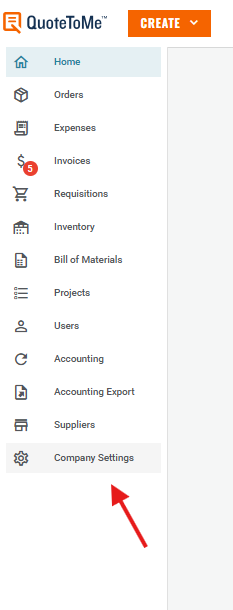
Step 1. Go to your Company Settings page in QuoteToMe:
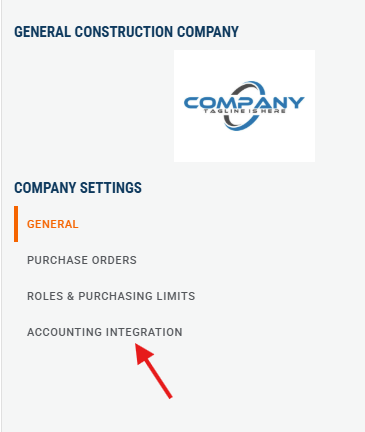
Step 2. Click on Accounting Integration:
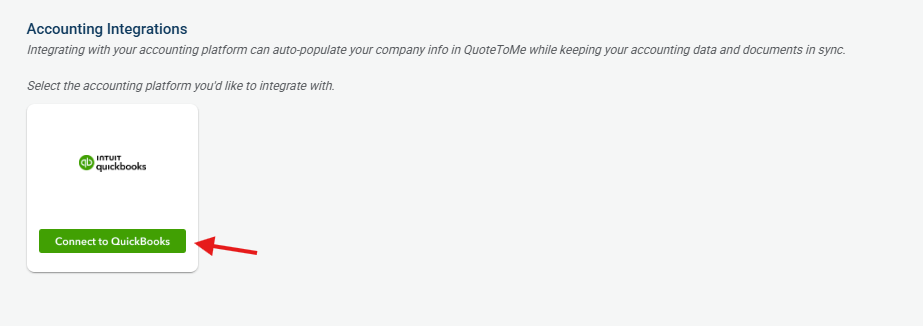
Step 3. Click the "Connect to QuickBooks" button
- Ensure you are logged into QuickBooks with Administrator privileges.
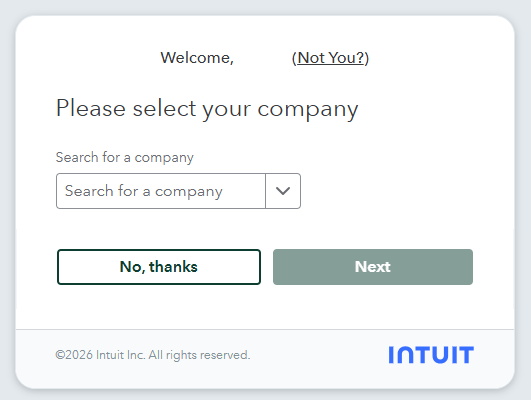
Step 4. A screen will appear prompting you to connect your QuickBooks instance.
- Select your desired instance if there is more than one, and click Next.
Done!
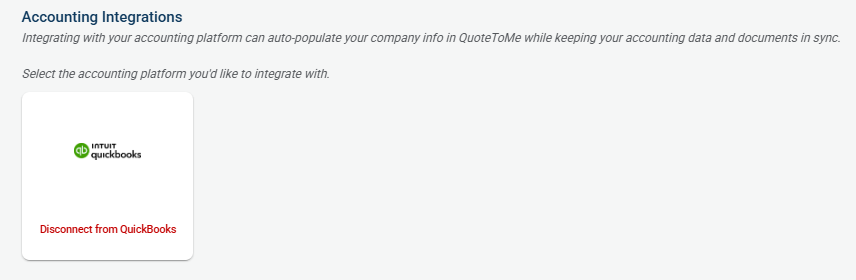
- The screen will now show a button that will allow you to disconnect the integration if needed.
Please see our Using QuickBooks with QuoteToMe page for further information on using QuickBooks & QuoteToMe together.
Need help?
Reach out to our Customer Support team:
- Call us toll-free at 1-833-712-5021
- Chat with us in our web and mobile apps

